
Technology Architects' AI-Powered Report Automation
Technology Architects' AI-Powered Report Automation
Microsoft Copilot Studio, Power Automate, and AI Builder Implementation
Technology Architects is a managed services provider delivering Continuous Technology Oversight to clients across North America. Their consulting engineers visit client sites regularly and produce detailed CTO reports covering everything from infrastructure health to strategic recommendations.
As the business grew, the time spent writing those reports started to compete with the time spent serving clients and Extrada helped implement a Microsoft Copilot Studio agent to offload manual reporting efforts.
The Project At a glance:
Challenges
Consulting engineers spent one to two hours after every site visit manually formatting notes into the approved CTO report template. Quality varied and there was no structured data capture.
Solutions
A conversational AI agent in Microsoft Teams collects visit notes through a guided chat, generates a professionally written report using AI, and saves a populated Word draft to SharePoint automatically.
Results
A complete, formatted CTO report draft is generated in under two minutes. Every report is consistent, structured, and saved to the right SharePoint folder automatically.
Turning Unstructured Notes Into Polished Reports
The core challenge here was a translation problem. Consulting engineers are good at observing, diagnosing, and advising clients. Manually formatting a Word document after every visit wasn’t the best use of their engineer’s time.
The manual process required engineers to remember the full report structure, translate observations into polished reports across thirteen sections, and format everything consistently inside a multi-page Word template.
The structure was fixed, the template was approved, and the information already existed in the engineer’s notes. What was missing was a system that could bridge the gap between raw input and formatted output. Extrada Tech built that using Microsoft Copilot Studio, AI Builder, and Power Automate, all running inside the Microsoft 365 environment Technology Architects already uses.
A Guided Conversation That Writes the Report for You
Extrada Tech built an automated reporting workflow inside the Microsoft 365 environment Technology Architects already uses every day.
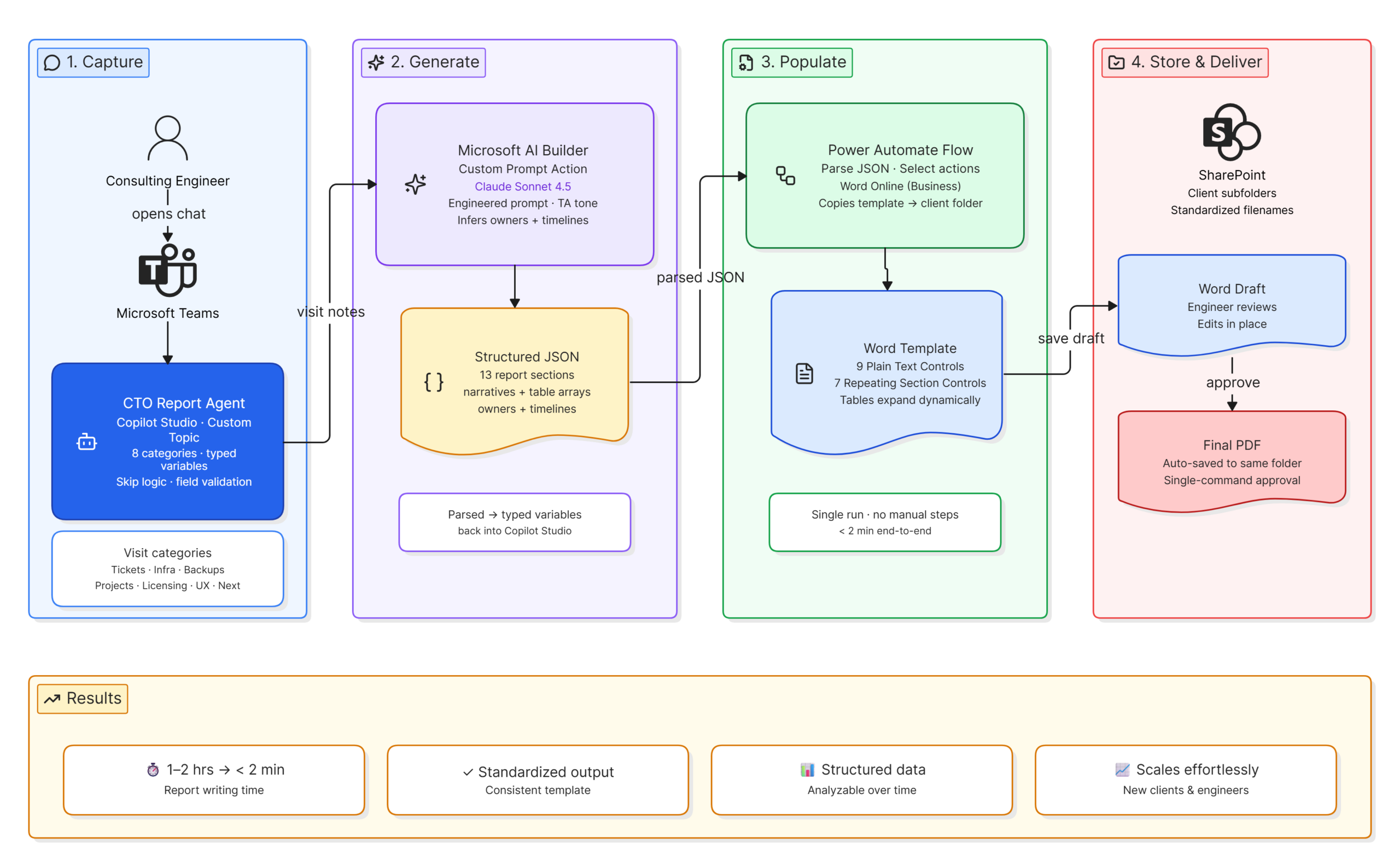
When an engineer returns from a site visit, they open a chat with the CTO Report Agent in Microsoft Teams. The agent walks them through the report one section at a time, asking about ticket trends, infrastructure observations, backup status, open projects, licensing renewals, end user feedback, and next steps. The engineer responds in plain language, the same way they would type notes to themselves.
Once all sections are covered, the system generates a complete, professionally written report, populates the approved Word template, and saves the draft to the correct client folder in SharePoint. The engineer reviews the draft, approves it with a single command, and a final PDF is saved automatically.
Technical Overview:
For those interested in the framework behind the solution, here’s how the architecture works under the hood. The system connects five Microsoft technologies into a single end-to-end workflow:
Conversational Agent in Microsoft Copilot Studio
The agent was built as a custom topic within Copilot Studio and deployed to Microsoft Teams. It manages the full conversation, collects eight categories of visit notes, stores each response as a typed variable, and coordinates the handoff to the AI model and Power Automate. It handles skip logic, validates that required fields like client name and visit date are captured, and confirms the report has been saved before closing the conversation.
Custom Prompt via Microsoft AI Builder
The report generation logic lives inside a custom prompt action built in AI Builder using Claude Sonnet 4.5. The prompt is carefully engineered to produce valid structured JSON covering all thirteen report sections, write in the professional tone of a Technology Architects consultant, handle missing information gracefully, and infer action item ownership and timelines from context when the engineer did not spell them out. The JSON output is parsed back into typed Copilot Studio variables before being passed to Power Automate.
Document Population via Power Automate
The Power Automate flow handles everything on the document side. It copies the Word template into the right client folder, populates it using the Word Online Business connector, and uses a series of Parse JSON and Select actions to convert the AI’s array outputs into the format that Word’s Repeating Section Content Controls expect. Nine text fields and seven dynamic tables are all populated in a single run with no manual steps involved.
Word Template Built for Automation
Extrada Tech configured Plain Text Content Controls for the narrative sections and Repeating Section Content Controls for the report tables. Each table expands or contracts based on what the AI identified during report generation, so the document always looks right regardless of how much or how little was discussed during the visit.
SharePoint File Management
All reports are stored in a centralized SharePoint site organized into client subfolders with standardized filenames that include the client name and visit date. Engineers always know exactly where to find every report, and nothing ever gets lost in someone’s local downloads folder.
Results That Give Engineers Their Time Back
What used to take one to two hours now takes two minutes. The engineer’s job is to share what they observed. The system handles everything else.
Applying This in Your Environment:
Most teams have already experimented with ChatGPT or Copilot. The next step is building something that works inside your environment.
If you’re thinking about where AI could support your organization, the technology is ready. We’d love to understand your business needs and explore where it fits within your Microsoft environment.